High-definition Xbox streaming on Android with advanced controls
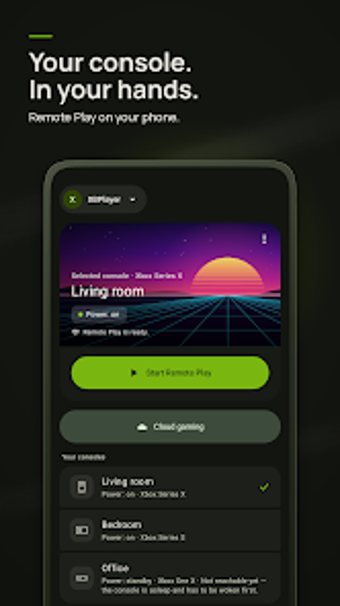
Streams 1080p Xbox Remote Play and Xbox Cloud Gaming from phone, tablet, or Android TV, offering detailed network diagnostics and custom touch controls. XBPlayer: Remote Play & Cloud, created by Hetko Apps Games, targets Xbox owners and Game Pass Ultimate subscribers seeking higher-resolution mobile streaming. Key offerings include 1080p support, resizable on-screen gamepad, controller remapping, and a rewarded ad based "Free Mode" playtime balance for occasional users.
Delivers console-grade streaming and flexible input on mobile
XBPlayer focuses on two daily tasks: playing installed console games over Remote Play and launching cloud titles via Xbox Cloud Gaming. The app supports 1080p streaming where network and service allow, and offers a resizable, movable virtual gamepad plus physical Bluetooth and USB controller support with advanced button remapping. These elements let handheld, tablet, and Android TV sessions use the same controls you set up once and save.
Connects to local consoles and cloud services with clear requirements
The tool runs on Android 7.0 and higher and handles local Remote Play to Xbox One and Series X|S consoles, as well as cloud streaming without a console. It lists a stable 5GHz Wi-Fi or Ethernet connection for optimal performance, and can switch between multiple consoles and Microsoft accounts. The app is independent of Microsoft, making it a third-party client rather than an official Microsoft product.
Shows live network diagnostics and configurable streaming options
The overlay displays real-time FPS, bitrate, packet loss, and frame-time stats so users can identify bottlenecks during play. The presence of those live metrics, together with explicit 1080p support, targets players who monitor connection stability rather than relying on default mobile settings. The interface adapts for handheld controllers and Android TV navigation, and a rewarded ad-based "Free Mode" gives time-limited access to premium streaming features.
To sum up, a practical pick for power users who want higher-quality mobile streaming
XBPlayer suits players who need 1080p mobile streams and granular input and network controls; it gives actionable diagnostics and controller remapping for regular sessions. Casual users benefit from the rewarded ad playtime balance, though anyone expecting an official Microsoft client should note it is an independent application. For daily handheld or TV-based play, it performs as a configurable, high-resolution streaming choice.